Problem #1: The "guest access" nightmare
In tools like Asana, ClickUp, and Notion, client sharing is broken. You aren't just sharing work—you're sharing the keys to the house.
Inviting a client into your project management tool often feels like letting a dinner guest into a messy kitchen. When you add them to a project, they see everything: the internal debates, the "v1_DO_NOT_SEND" files, and the side notes never meant for their eyes.
Why the "workarounds" don't work:
- Individual task sharing is a ghost town. You can technically share a single task, but the moment you try to share a group of tasks in context, the system breaks. The client loses the big picture, and you lose the ease of collaboration.
- Parallel projects are an admin nightmare. Sure, you can multi-home tasks into a "client-safe" project. But that forces your team to manage two worlds—duplicating work, breaking context, and creating a constant sync overhead just to stay "safe."
- The "Leak" anxiety. Without granular, per-item sharing, your team manages access through hope. You spend more time double-checking visibility than actually hitting deadlines.
You want them to see the Dining Room (the finished work). But the software forces them into the Kitchen (the chaos).
The Upbase solution: Per-item sharing control
We've replaced the all-or-nothing gamble with granular, per-item guest control. Stop building parallel projects and duplicating tasks. With Upbase, you work in one single place, but you control exactly what the client sees.
- Per-item guest sharing: Finally, you can share specific tasks, docs, or files within a project while keeping the rest hidden. No more "shadow projects" or broken context.
- Instant visual clarity: Eliminate the guesswork. Clearly see what's client-visible and what's not—at a glance—so you never have to double-check permissions again.
- Total visibility control: Toggle any item to "Internal Only" or "Client Visible" with one click. Your team can collaborate, brainstorm, and iterate in the same space where the client sees the final result—without the two ever crossing paths.
- Contextual collaboration: Your clients see the big picture and the specific updates they need, framed exactly how you want them to see it.
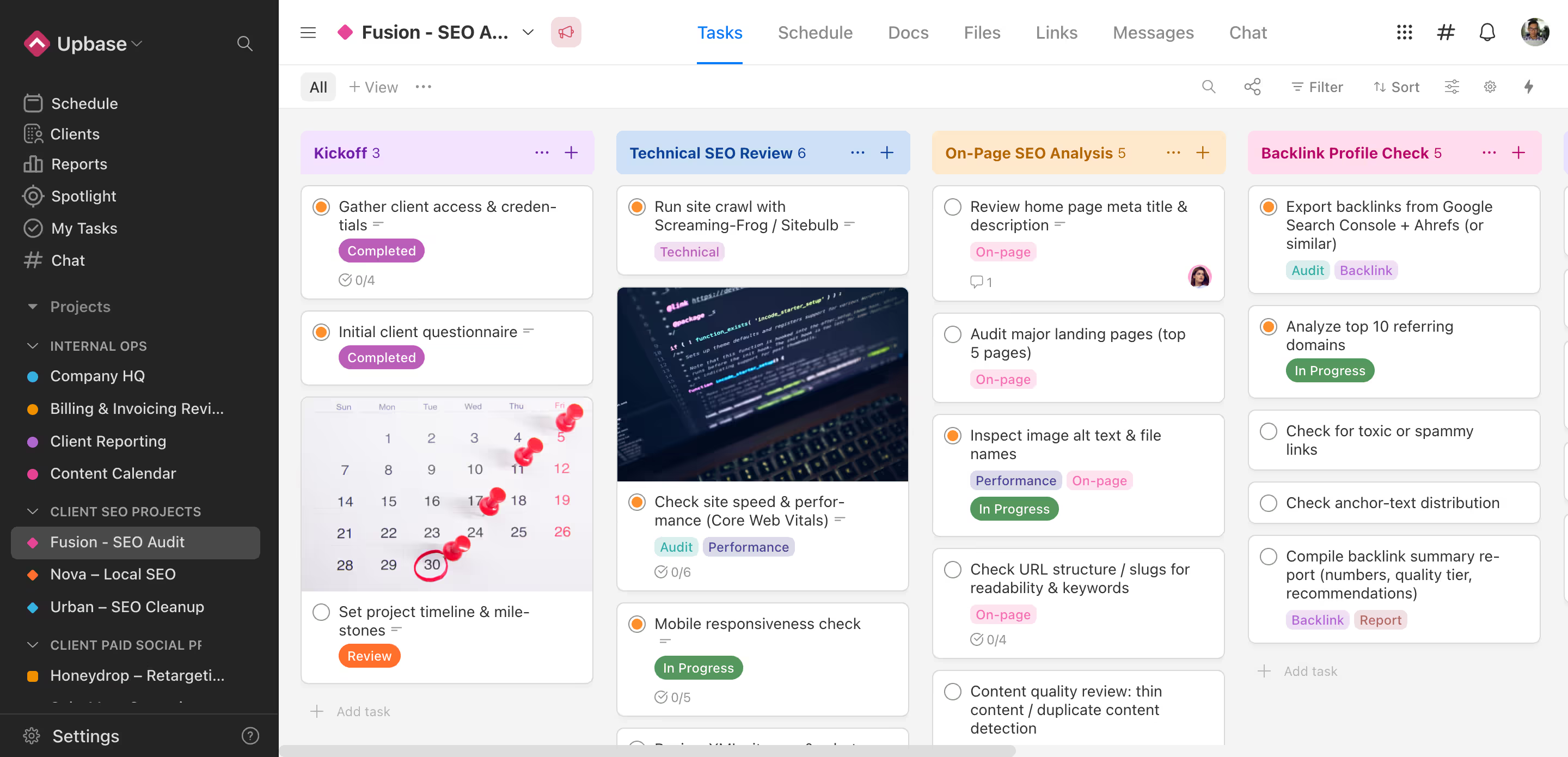
One project. Two views.
Internal teams get the Kitchen (the raw process, the messy notes, and the internal conversation). Clients get the Dining Room (the polished updates, the clear timelines, and the deliverables).
No duplication. No leaks. Just seamless collaboration.
Problem #2: The client context gap
Generic PM tools are project-first, not client-first.
In Asana or ClickUp, your data is organized by projects. But your business is organized by clients. This mismatch creates a massive "Context Gap" that forces your team to work harder.
- Fragmented progress: Status and next steps are buried across multiple boards, leaving you blind to the real health of the account.
- Invisible risks: It's nearly impossible to spot a "red flag" when the data is spread across different views.
- The manual reporting tax: You spend hours every week pulling data from different projects just to answer one simple question: "How is this client doing overall?"
Instead of a single source of truth, you have a fragmented mess.
The Upbase solution: Internal Client Dashboard
In Upbase, clients aren't just a folder or a tag—they are first-class citizens. We've built a dedicated Internal Client Dashboard that acts as your team's command center for every account.
Stop stitching updates together. Start managing relationships.
Instead of jumping between boards to find the truth, you get a single, high-level view of the entire client relationship in one screen.
- A unified project overview: See every active project for a client, their real-time status (like "Off track" or "At risk"), and completion percentages in one list.
- High-priority task tracking: Instantly see what's upcoming, what's overdue, and what was recently completed across all projects for that specific client.
- Identify bottlenecks: A dedicated "client action required" section highlights exactly where you are waiting on the client, so you can follow up and keep the momentum.
- Centralized internal resources: Keep critical documents like MSAs, billing trackers, and design links right where the team needs them—private and easily accessible.
- Internal-only notes: Maintain a "permanent record" of internal notes, kickoff summaries, and status updates that stay private to your team.
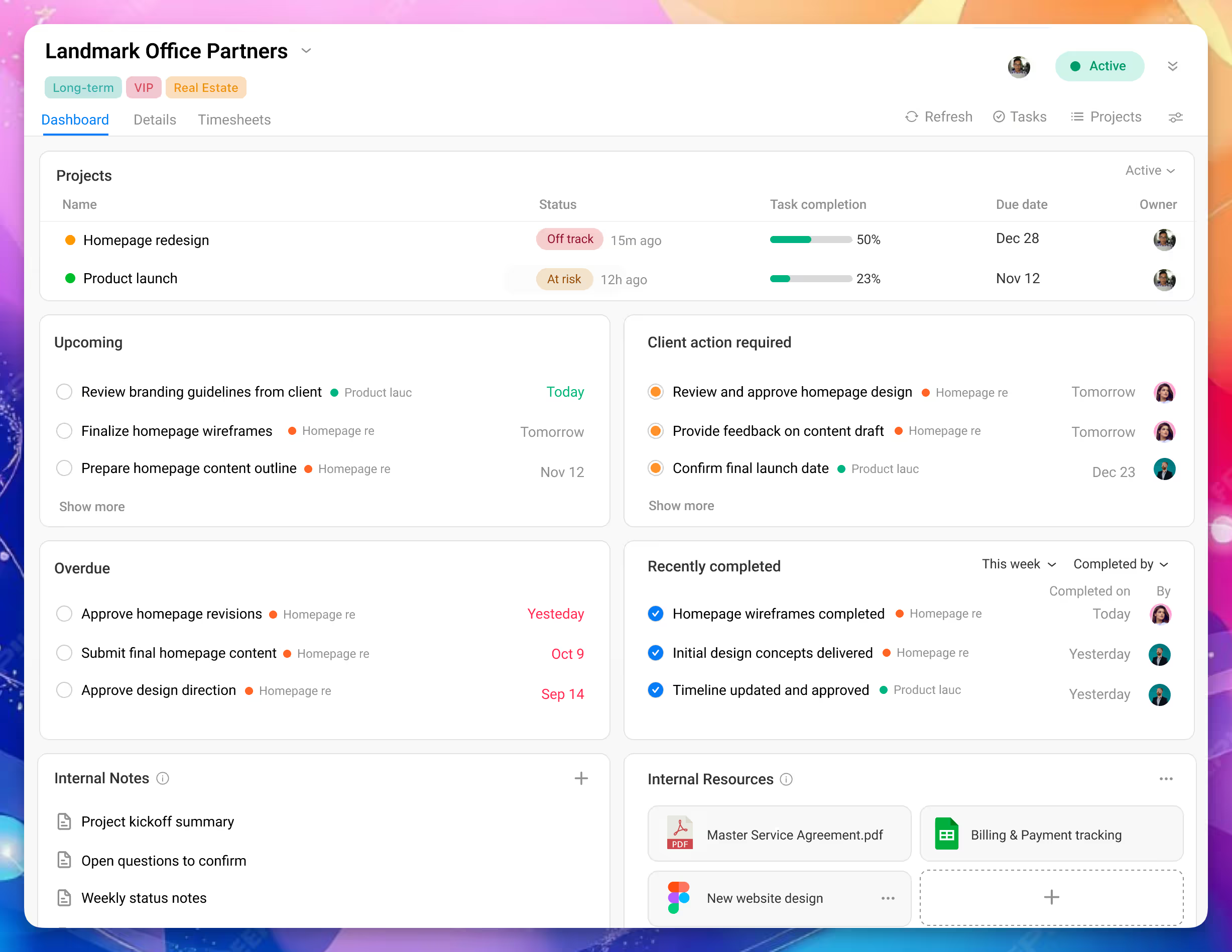
No more fragmented data. No more manual reporting. Just one place for your team to see the full picture and act with confidence.
Problem #3: Clients are left in the dark
Most PM tools treat clients as guests trapped inside individual projects. Even when you give them access, they're still missing the big picture.
Because work is siloed by project, your clients have to hunt for information. They can't quickly answer the questions that matter most:
- What needs my input right now?
- What was finished recently?
- What's overdue or coming up next across all my projects?
Context is scattered. When clients can't find their own answers, the burden falls back on your team.
Clarity is replaced by a never-ending cycle of status emails, Slack pings, and "quick" meetings just to answer the question: "Where are we at?"
The Upbase solution: A dedicated Client Dashboard
In Upbase, clients are still invited into projects — but they also get a dedicated client-facing dashboard built specifically for them.
It pulls everything together into one crystal-clear view.
- A unified client home: Your clients see a birds-eye view of every project you're running for them in one place.
- The "action required" list: A dedicated section that shows clients exactly what they need to review or approve right now—no digging through email threads required.
- Cross-project transparency: They can see upcoming, overdue, and recently completed tasks across all their projects in a single feed.
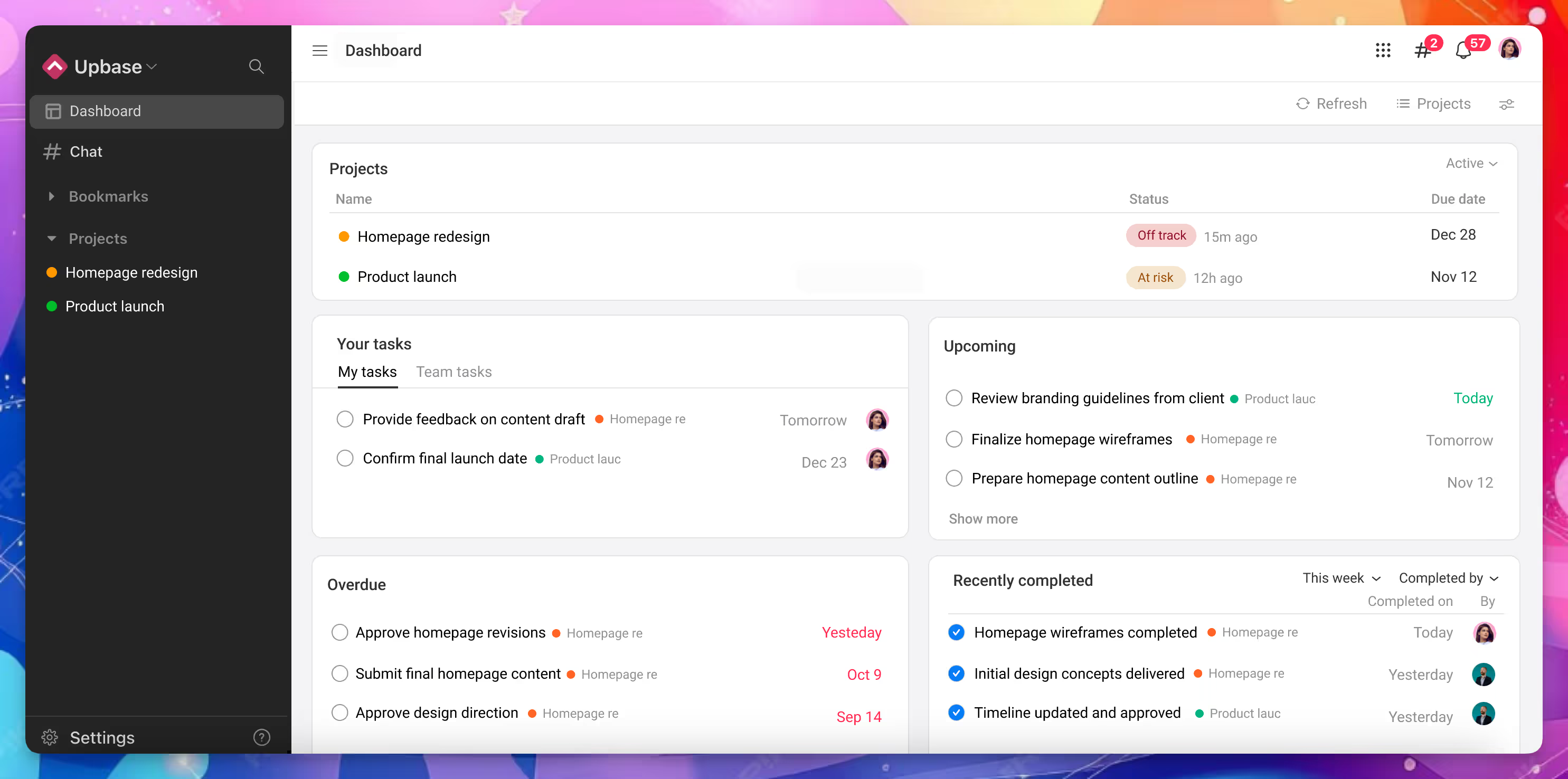
No digging through projects.
No learning complex PM views.
No chasing updates by email.
Clients stay informed and focused — and teams spend less time explaining, reminding, and following up.
One system. Three problems solved
Upbase gives agencies:
- Per-item sharing → Safe, precise client collaboration
- Internal Client Dashboard → Full operational visibility
- Client-facing Dashboard → Clear, calm client experience
Internal clarity for teams.
External transparency for clients.
No duplicate work. No workarounds.