You just signed a new client.
The contract is in, the Slack messages are flying, and your team is excited.
Then three weeks later, nobody knows who owns what, the client is already frustrated, and you’re scrambling to look organized.
That gap between “signed deal” and “smooth working relationship” is where most agency client relationships quietly break.
A Wyzowl study found that 86% of clients stay loyal to companies that invest in onboarding. Which means the other 14% are walking out the door before you’ve even delivered real results.
We built a free resource board with the best tools, templates, and guides for running a small agency. No signup required.
Browse the Agency Resource Hub →This client onboarding checklist breaks the process into five phases you can run in 72 hours or less, with specific scripts, tool setups, and templates you can copy today.

Why most agency client onboarding falls apart (and what it costs you)
Bad onboarding doesn’t announce itself.
It shows up as vague Slack messages in week two, a missed deadline in week four, and a “we need to talk” email in month three.
The root cause is almost always the same: no system. Most agencies treat onboarding as a loose collection of tasks that someone remembers to do.
Send the welcome email.
Set up the folder.
Schedule the kickoff call.
Maybe.
Here’s what that looks like at 90 days compared to an agency that runs a real onboarding process:
| Agency without onboarding system | Agency with onboarding system | |
|---|---|---|
| Week 1 | Welcome email sent 2 days late. No internal briefing. | Welcome email sent within 1 hour of signing. Internal brief completed same day. |
| Week 3 | Client asks “who should I contact about X?” for the third time | Client knows exactly who handles what and where to find project status |
| Month 2 | First deliverable is late because scope was never clarified | First milestone delivered on time because scope was locked in the kickoff |
| Month 3 | Client starts shopping for a new agency | Client refers a second company to you |
| Revenue impact | $0 in referrals. Negative ROI on acquisition cost. | $15K-$50K in referral revenue per retained client |
The cost of replacing a churned client is 5-25x higher than keeping an existing one. That makes your onboarding checklist one of the highest-ROI documents in your agency.
The 5-phase agency onboarding system
Most client onboarding checklists dump 10-17 steps into a flat list. That’s a task list, not a system.
The 5-Phase Agency Onboarding System groups every onboarding task into the phase where it actually belongs. Each phase has a clear owner, a time window, and a done-state.
Here’s the framework at a glance:
| Phase | What happens | Time window | Owner |
|---|---|---|---|
| 1. Close the gap | Sales-to-ops handoff, contract finalized, expectations set | Day 0 (signing day) | Account lead |
| 2. Internal setup | Team briefed, workspace created, tools configured | Day 0-1 | Project manager |
| 3. Client kickoff | Kickoff meeting, questionnaire, communication norms | Day 1-2 | Account lead |
| 4. Workspace build | Client-facing project space, access shared, files organized | Day 2-3 | Project manager |
| 5. Lock the rhythm | Check-in cadence, reporting schedule, feedback loop | Day 3-7 | Account lead |
Every task in this checklist maps to one of these five phases. No orphaned to-dos.
Phase 1: Close the sales-to-ops gap before it opens
The most dangerous moment in any client relationship is the handoff from the person who sold the work to the person who delivers it.
If your sales lead promised “we’ll have the brand audit done in two weeks” but your strategist wasn’t in the room, you’ve already lost trust before you’ve started.
Phase 1 checklist:
- Hold a 15-minute internal handoff call between sales and the delivery team. Cover: what was promised, what the client cares about most, any red flags from the sales process.
- Confirm the signed contract includes a clear scope of work, payment terms, and communication expectations.
- Send the welcome email within one hour of contract signing.
- Share the client’s signed contract and SOW in your project management tool so the delivery team can reference it directly.
Pro tip: The welcome email is your first impression as a delivery team. Don’t send a generic “we’re excited to work with you.” Send something specific.
Here’s a welcome email structure that works:
Subject: You’re in. Here’s what happens next.
Hi [Client name],
Welcome aboard. We’re kicking things off this week and wanted to give you a quick look at what the next 72 hours look like:
1. You’ll receive a short onboarding questionnaire (takes ~10 minutes) 2. We’ll schedule a kickoff call with your dedicated team 3. You’ll get access to your project workspace where everything lives
Your main point of contact is [Name], who you can reach at [email] or [Slack channel]. If anything comes up before the kickoff, reach out directly.
Talk soon, [Your name]
That’s it. Short, specific, and action-oriented.

Phase 2: Set up internally before the client sees anything
This phase is invisible to the client. That’s the point.
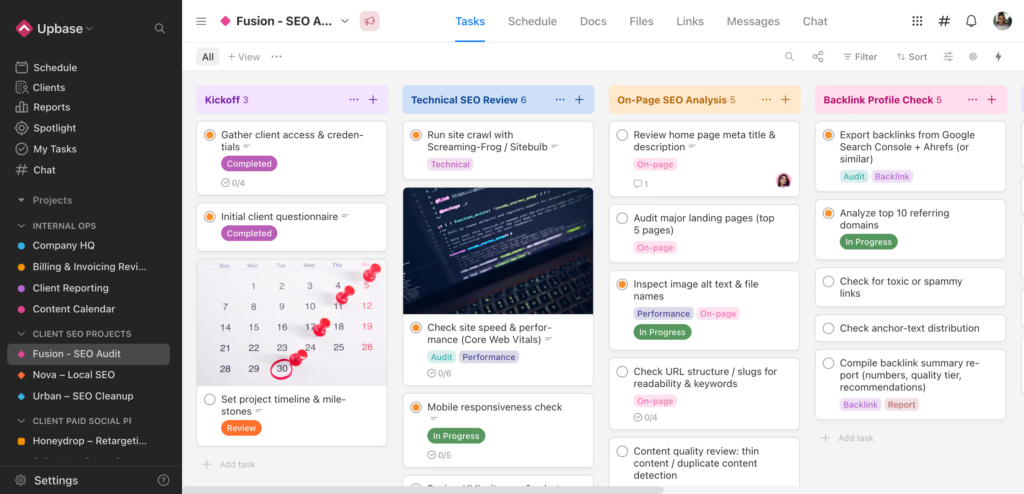
Before your new client ever opens a project dashboard or joins a Slack channel, your internal team should already know who does what, where files live, and what the first milestone looks like.
Phase 2 checklist:
- Create the client workspace in your project management tool. Set up folders for deliverables, briefs, assets, and communication logs.
- Assign roles: who is the day-to-day contact, who handles creative, who manages the timeline?
- Brief the full team on the client’s business, goals, and any quirks from the sales process.
- Set up time tracking for the client from day one. Agencies that wait until “the real work starts” to track time lose 10-20% of billable hours.
- Pre-fill the client onboarding questionnaire with everything you already know from the sales process. Only ask the client for what’s new.
That last point is worth repeating. Nothing kills client confidence faster than asking them to repeat everything they told your sales team.
Pre-fill your questionnaire with notes from the pitch. Then frame it as: “We’ve captured what we learned during our initial conversations. Take 10 minutes to confirm what we got right and fill in any gaps.”
Sample questionnaire sections to include:
- Primary business goals for this engagement (pre-filled from sales notes)
- Key contacts and decision-makers on the client side
- Brand guidelines, style guides, or existing assets to share
- Preferred communication channel and response time expectations
- Any hard deadlines or external events tied to the project
- Tools and logins the agency will need access to
Phase 3: Run a kickoff meeting that actually kicks things off
Most agency kickoff meetings are 60-minute rambles where everyone introduces themselves and then someone says “so… what are we doing first?”
A good kickoff meeting is 30-45 minutes, follows a set agenda, and ends with the client knowing exactly three things: what’s happening this week, who to contact, and when the first check-in is.
Phase 3 checklist:
- Send the meeting agenda to the client 24 hours before the call. Let them add items.
- Introduce the delivery team by name and role. Keep it to 60 seconds. Nobody wants a 10-minute round of intros.
- Walk through the project scope and confirm it matches the client’s understanding.
- Agree on communication norms: which channel for what, expected response times, meeting cadence.
- Identify the first milestone and its deadline. End the meeting with this locked in.
- Send a follow-up summary within 2 hours of the call. Not the next day. Two hours.
Kickoff agenda template (30 min):
| Time | Topic | Who leads |
|---|---|---|
| 0-3 min | Quick intros (name + role only) | Account lead |
| 3-10 min | Scope and goals confirmation | Account lead |
| 10-18 min | Communication norms and tools | Project manager |
| 18-25 min | First milestone and timeline walkthrough | Project manager |
| 25-28 min | Open questions from the client | Account lead |
| 28-30 min | Recap next steps and action items | Account lead |
Upbase makes this easier. Set up your client’s project in Upbase before the kickoff, then share the workspace during the call. Clients see their tasks, docs, and messages in one place from day one, without needing to learn a complex tool.

Phase 4: Build the client workspace in under an hour
Your client workspace is the single biggest factor in whether a client feels organized or lost during the first month.
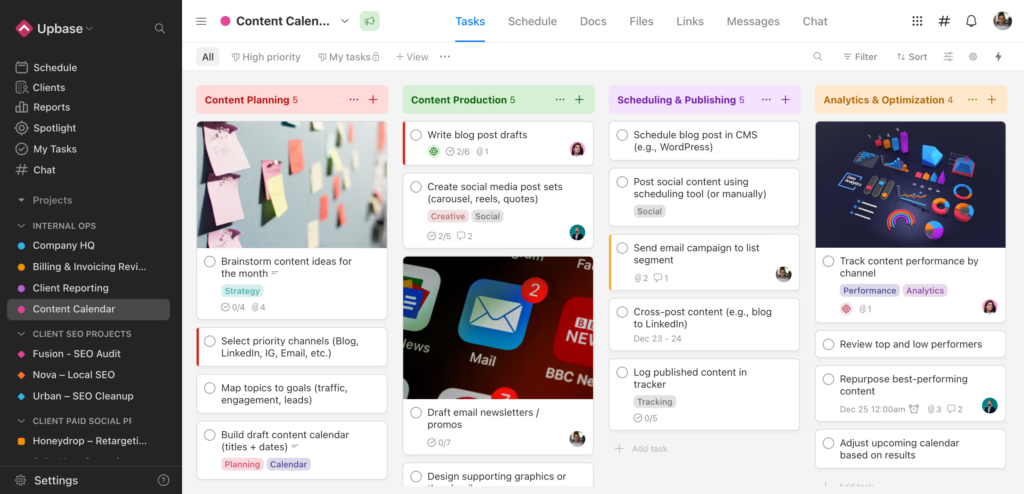
If they have to dig through email threads to find a brief, or Slack you to ask where the latest version of a file is, your onboarding failed.
Phase 4 checklist:
- Share access to the project workspace with the client’s key contacts. Send login instructions if needed.
- Pin or highlight the three most important items: the project scope/SOW, the current milestone, and the contact list.
- Set up a dedicated communication channel for the client. Keep project discussions out of email.
- Upload all signed contracts, brand assets, and reference documents to a shared file space.
- Create a saved links section with every tool, login, and resource the client needs.
- Walk the client through the workspace in a 10-minute screen share. Don’t just send a link and hope they figure it out.
What a clean client workspace includes:
| Section | What goes here |
|---|---|
| Overview | Project scope, key contacts, timeline |
| Tasks | Active tasks with owners and due dates |
| Docs | Briefs, meeting notes, strategy docs |
| Files | Brand assets, contracts, deliverables |
| Links | Analytics dashboards, shared tool logins |
| Messages | All project communication in one thread |
The 10-minute walkthrough is non-negotiable. Even if your tool is intuitive, the client needs someone to say “here’s where you’ll find updates, here’s how you leave feedback, and here’s who to ping if something is stuck.”
Phase 5: Lock in the ongoing rhythm
Onboarding doesn’t end after the kickoff. It ends when the client stops thinking about the process and starts thinking about the results.
That transition happens when you establish a repeatable rhythm in the first week.
Phase 5 checklist:
- Schedule recurring check-ins. Weekly for the first month, then adjust based on the client’s preference.
- Send the first progress report within 7 days. It doesn’t have to be elaborate. “Here’s what we did this week, here’s what’s next, here’s anything we need from you.”
- Set up a feedback loop. Ask the client after week one: “Is the communication cadence working? Too much? Too little?”
- Document every process decision in the project workspace so new team members can ramp up without re-asking the client.
- Identify one quick win you can deliver in the first 10 days. A small deliverable, a fast optimization, or an insight from your initial audit.
That quick win matters more than you think. It gives the client something tangible to point to when their boss asks “how’s the new agency doing?”
The best quick wins are things that take your team less than 4 hours but make the client look good internally: a competitor gap analysis, a quick SEO audit, a landing page wireframe, or a social content calendar for the next two weeks.
What to do in the first 72 hours (timeline)
Here’s every onboarding task mapped against a real timeline. Print this or paste it into your project management tool.
| Timeframe | Task | Owner |
|---|---|---|
| Hour 0-1 | Send welcome email | Account lead |
| Hour 0-1 | Hold internal handoff with sales | Account lead + PM |
| Hour 1-4 | Create client workspace and folders | Project manager |
| Hour 1-4 | Brief the delivery team | Account lead |
| Hour 1-4 | Set up time tracking | Project manager |
| Hour 4-8 | Send pre-filled onboarding questionnaire | Account lead |
| Day 1-2 | Schedule and prep kickoff meeting | Account lead |
| Day 2 | Run kickoff meeting (30-45 min) | Account lead + PM |
| Day 2 | Send kickoff follow-up summary | Account lead |
| Day 2-3 | Share client workspace access | Project manager |
| Day 2-3 | 10-minute workspace walkthrough | Project manager |
| Day 3-7 | Schedule recurring check-ins | Account lead |
| Day 3-7 | Deliver quick win | Delivery team |
| Day 7 | Send first progress report | Account lead |
Every row has an owner. Every row has a time window. No ambiguity.
Onboarding mistakes that silently kill client retention
These don’t look like mistakes when they happen. They look like “we’ll figure it out later.” But by the time you notice the damage, the client is already halfway out the door.
Mistake 1: Making the client repeat themselves. If your sales team collected their brand guidelines, target audience, and KPIs during the pitch, don’t ask for all of it again in a questionnaire. Pre-fill what you know. Confirm, don’t interrogate.
Mistake 2: Skipping the internal handoff. The delivery team needs to hear directly from the person who sold the deal. Not read a summary. Not get a forwarded email. A 15-minute call where they can ask questions prevents weeks of misalignment.
Mistake 3: Treating the kickoff as a formality. A kickoff without a clear agenda, confirmed scope, and agreed-upon first milestone is just a social call. It feels productive but produces nothing.
Mistake 4: Not sending the first progress report for 30+ days. By day 30, the client has already formed an opinion about your agency. If they haven’t seen a single progress update, that opinion is “I don’t know what they’re doing.” Send a report in week one, even if it’s short.
Mistake 5: No single source of truth. If the client has to check email for contracts, Slack for updates, Google Drive for files, and a separate tool for tasks, you’ve created friction. Put everything in one workspace.
Tools that make agency onboarding faster
You don’t need 12 tools for onboarding. You need one good project management platform and a few supporting tools for specific jobs.
| Category | Recommended tools | What it handles |
|---|---|---|
| Project management + client workspace | Upbase, Basecamp, Asana | Tasks, docs, files, communication, client portal |
| Contracts and e-signatures | PandaDoc, DocuSign, HelloSign | SOW, NDA, contract signing |
| Time tracking | Upbase, Toggl, Harvest | Billable hours from day one |
| Communication | Upbase chat, Slack, Microsoft Teams | Real-time messaging and async updates |
| Password sharing | 1Password, LastPass | Secure credential sharing with clients |
| Questionnaires | Typeform, Google Forms, Notion forms | Client intake and onboarding surveys |
The fewer tools your client needs to learn, the smoother the onboarding. If your project management platform already handles tasks, docs, chat, and files, don’t add three more tools on top.
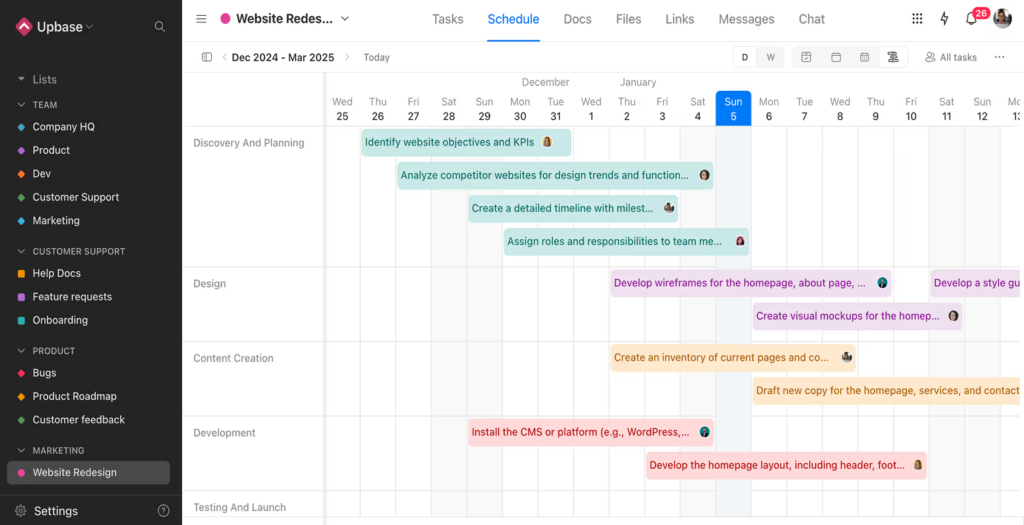
Upbase was built for exactly this. Instead of stitching together Slack + Asana + Google Drive + a separate client portal, Upbase gives agency teams and their clients a single workspace with tasks, docs, chat, files, and time tracking built in. Fewer tools means faster onboarding for everyone. See how it works →
FAQ
How long should client onboarding take for an agency?
Most agency onboarding should be complete within 3-7 business days. The first 72 hours cover the critical tasks: welcome email, internal handoff, kickoff meeting, and workspace setup. The remaining days are for locking in the communication rhythm and delivering a quick win. If your onboarding regularly takes more than two weeks, you have a process problem.
What should be in a client onboarding questionnaire?
Focus on what you don’t already know from the sales process. Key sections include: primary business goals, key contacts and decision-makers, brand guidelines or existing assets, preferred communication channels, hard deadlines or external events, and tool access or logins the agency needs. Pre-fill anything your sales team already captured so the client only fills in gaps.
What’s the biggest mistake agencies make during client onboarding?
Making the client repeat information they already shared during the sales process. It signals disorganization and erodes trust before the work even begins. The fix is simple: hold a 15-minute internal handoff between sales and delivery, and pre-fill your onboarding questionnaire with what you already know.
How do I onboard clients when my agency is small (2-5 people)?
The process is the same. The roles just overlap. In a small agency, the person who sold the deal is often the person who delivers it, which actually eliminates the sales-to-ops gap. Focus on the workspace setup and the first-week rhythm. Use a tool like Upbase that doesn’t require a dedicated admin to set up and maintain.
Should I send a welcome package to new clients?
A physical welcome package (branded notebook, handwritten note, stickers) is a nice touch for high-value retainer clients. But it’s not a substitute for a fast, organized onboarding process. The welcome email with clear next steps matters more than swag. If you do send a package, ship it the day the contract is signed so it arrives during the first week.
If you only take one thing from this checklist, make it Phase 1.
Close the gap between sales and delivery before it opens.
That single 15-minute internal handoff prevents more client churn than any welcome package or onboarding questionnaire ever will.
If you run an agency, this will feel familiar: Messy client work. No clear profitability. Too many tools. Upbase fixes that!
Start free →