If you frequently find yourself switching back and forth between multiple ongoing tasks, you’re going to love this feature.
Imagine the convenience of having your important tasks always at hand, ready to be resumed with just a click.
Let’s explore how it works.
On the task detail page, click the “Minimize” icon to pin it to the tray.

When you want to return to a task, simply click on it in the tray. This allows you to quickly switch between tasks and resume your work efficiently.
We built a free resource board with the best tools, templates, and guides for running a small agency. No signup required.
Browse the Agency Resource Hub →
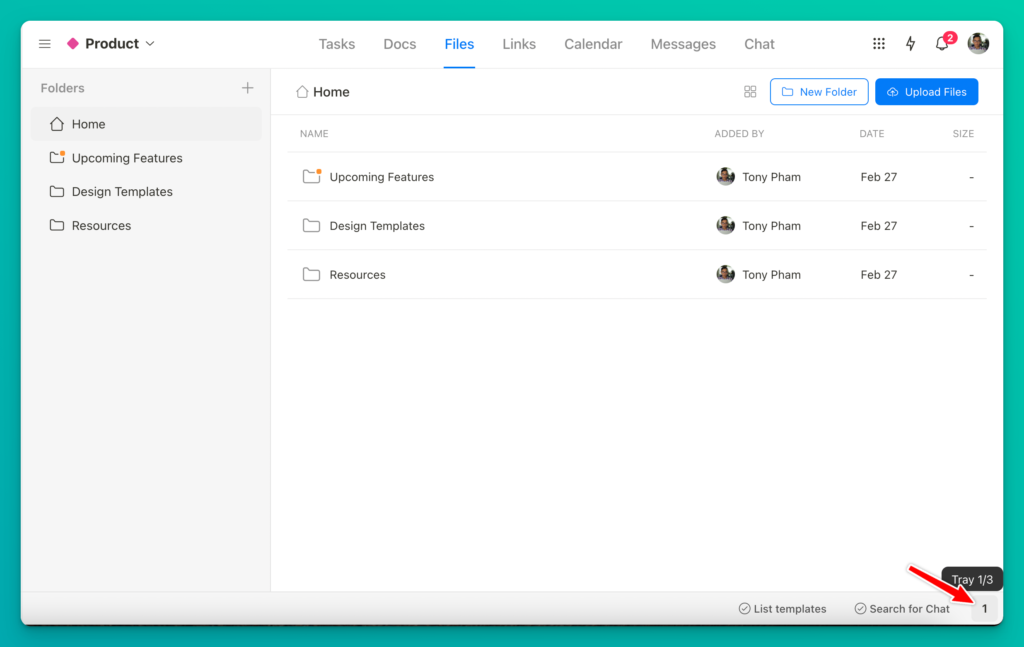
The best part is that the Tray isn’t just limited to tasks. You can also pin a wide range of items, such as docs, files, links, messages, and even folders.

When needed, you can hide the Tray to eliminate clutter and distractions.

New update: We’ve added two more Trays! Now, you can pin items to a total of three Trays. This will make it much easier for you to categorize all your pinned items.
Recent updates
- 7 updates to make working with tasks faster June 8, 2026
- 🎉 New in Upbase: Bookmarks, Notes, and Recents — now one keystroke away from anywhere May 28, 2026
- 🎉 New in Upbase: Rename and reorder modules, resizable sidebar, and description templates May 21, 2026
- 🎉 New in Upbase: Workspace timeline and Daily review May 5, 2026
- 🎉 New in Upbase: Retainer billing and the Profitability Report April 22, 2026