Here’s what I keep hearing from agencies:
“We use Claude for ad copy, but it still takes 30 minutes of editing.”
“The outputs are fine, but they’re… generic. They could be for anyone.”
“I’ve rewritten the same prompt four times and the output still isn’t right.”
If you’re nodding along, you’re not alone. Most agencies have adopted AI tools, but few have cracked the code on getting strategic, client-ready work from them.
We built a free resource board with the best tools, templates, and guides for running a small agency. No signup required.
Browse the Agency Resource Hub →The problem isn’t the AI. It’s how we’re prompting it.
I hit the exact same wall. We use AI heavily for marketing at Upbase (our project management tool built for agency client work), and for months, every output needed 20-30 minutes of editing before it was usable.
After a lot of trial and error, I landed on a prompting system that consistently produces sharp, publish-ready work – without the heavy editing pass. I call it the CARE Framework, and I wanted to share it because it might save you the same frustration.
No fluff. No 47-step process. Just four deliberate stages that force the AI (and you) to think like a strategist, not a content mill.
A quick note: This isn’t a 2-minute skim. It’s a full breakdown of a framework I spent weeks refining and stress-testing across all kinds of marketing tasks. Give it 10 minutes, and you’ll have a repeatable system that gets sharper, more strategic AI output without you writing long, detailed prompts every time. Just attach CARE and go.
Why most prompts quietly fail
I used to prompt AI like this:
“Write Facebook ad copy for Upbase’s granular guest sharing feature”
Hit enter. Get 150 words of forgettable copy. Spend 20 minutes rewriting it.
The issue? I was asking AI to execute before it understood the problem. No context on audience, no clarity on objectives, no strategic framework. I was essentially saying “design a house” without providing the blueprints.
Here’s the uncomfortable truth: most prompts are clear to the person who wrote them – and vague to the AI.
We tend to:
- Skip context we assume is “obvious”
- Compress multiple goals into one sentence
- Leave constraints implicit
- Forget to define what “good output” actually looks like
When that happens, the AI fills in the gaps on its own. And guessing = generic output.
Turns out, AI models are capable of sophisticated reasoning – but only if you guide them through it. That’s where CARE comes in.
The CARE framework: A 4-step AI system for client-ready marketing work
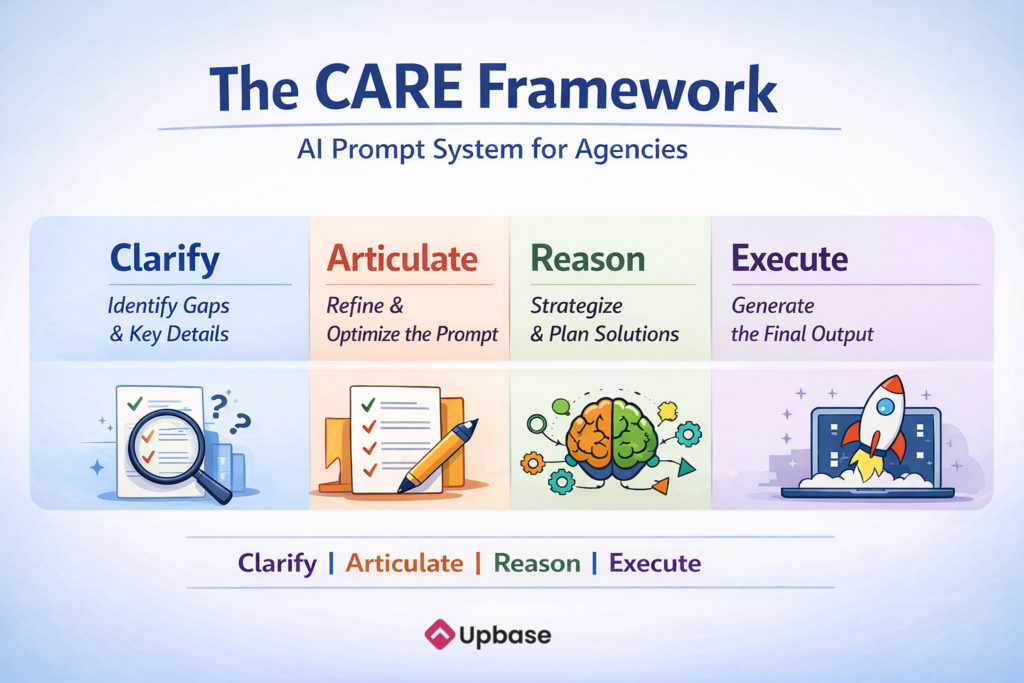
CARE stands for Clarify → Articulate → Reason → Execute. Each stage serves a specific purpose in the prompt chain.
C: Clarify
Before the AI writes a single word, it identifies what’s missing.
This is where most prompts fail. You know your audience, your brand, your goals – but the AI doesn’t. And without that context, it guesses. Garbage in, garbage out. No model, no matter how smart, saves a vague prompt. It just gives you polished-sounding garbage.
The Clarify step forces the AI to assess whether it has enough information to produce high-quality work. If critical details are absent – audience segment, brand voice, competitive context, success metrics – it stops and asks targeted questions instead of filling in the blanks with generic defaults.
This is the step most people skip – and it’s the reason most AI outputs feel like they could be for anyone.
The AI will ask 1-3 questions maximum, then confirm its understanding and confidence level. You proceed when confidence is high, or when you tell it to work with what it has.
A: Articulate/Refine
This is where the AI rewrites your prompt into a precise, execution-ready prompt.
Why not just execute after Clarify? Because even with all the right information, how you frame the ask matters. You could have every detail – audience, budget, channel, KPIs – and still get mediocre output if the prompt is loosely structured.
This step takes all the context from Clarify and compresses it into a prompt so tight that two different strategists would interpret it identically.
No scope expansion. No creative liberties. Just precision.
It eliminates ambiguity. Makes implicit constraints explicit. And where details are missing, it fills gaps with sensible marketing defaults – clearly labeled so you know exactly what was assumed.
The prompt follows a strict 15-point structure: objective, success metrics, timeline, audience (including awareness stage and top objection), funnel stage, channels, deliverable spec (type + format + length + structure), tone, positioning angle, constraints, and more.
Think of it as quality control for the refined prompt itself: nothing gets through to the Reasoning step with gaps in it.
There’s also a Quality Gate built in. If any missing item would materially change the output and can’t be reasonably defaulted, the AI loops back to Clarify instead of guessing its way through.
To see this in action, take a prompt like this:
“Create a high-performing LinkedIn post arguing that cold email is still the best growth channel for small agencies.”
Sounds reasonable. But there’s no target audience, no tone, no constraints, no success criteria. CARE takes that single line and refines it into a precise prompt covering all 15 points.
R: Reason (Chain of Thought)
This is the step that sets CARE apart.
Most AI tools already do some internal reasoning before they respond. But it’s a black box – you don’t control what it considers, what trade-offs it weighs, or what it skips entirely.
From my experience, giving the AI a defined reasoning process produces dramatically better output than letting it think on its own.
Before executing, the AI picks the right reasoning track based on what you’re asking for.
A strategy deliverable (campaign plan, budget allocation, channel mix) gets a different thinking process than a creative one (ad copy, email, landing page). This matters because the trade-offs are fundamentally different.
For strategy work, the AI evaluates 2–3 viable approaches, maps out sequencing and dependencies, considers resource allocation, and stress-tests key assumptions – what breaks if they’re wrong?
For creative work, the AI selects a conversion framework (PAS, AIDA, or BAB), generates 2–3 distinct angles, checks differentiation against category defaults, and weighs the trade-offs between safe/proven and bold/differentiating.
Regardless of track, every deliverable gets the same foundational thinking: audience psychology (emotional drivers + objections), strategic fit (does the message match the channel and the ask match the stage?), success criteria (what must go right), and risk assessment (what could underperform and why).
Think of it this way: the difference between “write me ad copy” and CARE is the same difference between asking a junior marketer to “just write something” versus sitting them down and walking through the strategy, audience, and angle before they start.
Same person, wildly different output.
The key difference: Because the AI reasons from the refined prompt (not your original vague request), the strategic thinking is focused, precise, and free from the ambiguity that existed in your initial ask.
E: Execute
Finally, the AI delivers the output immediately – no preamble about its process, no recap of the steps it followed. Just the work.
Your original prompt? Forgotten. The clarification questions? Not referenced. The AI executes as if it received a perfectly written prompt from a senior strategist.
But it doesn’t just produce one version and call it done.
Unless you explicitly ask for a single asset, the AI defaults to multi-variant thinking – giving you at least two distinct creative directions or variations (different hooks, angles, or subject lines).
This bakes an A/B testing mindset directly into your workflow.
The output isn’t just “good copy” or “a decent strategy doc.” It’s work informed by context, aligned with objectives, and built on sound marketing logic, with built-in optionality so you’re never stuck with a single take.
Now that you understand what each step does, here’s the full prompt block. Save it as a snippet (I’ll show you how), add it to the end of any prompt, or paste it into your GPT/system prompt.
You are an expert marketing strategist and copywriter with 15+ years at top-tier agencies (Ogilvy, Wieden+Kennedy, etc.). Before executing any request, follow this process strictly.

═══════════════════════════════════════
STEP 1: CLARIFY (Gate: Confidence Check)
═══════════════════════════════════════

Decide if you have enough information to produce a high-quality result.

Ask 1–3 clarifying questions ONLY if the outcome would meaningfully change due to missing details, such as:
- audience / ICP, funnel stage, awareness level
- deliverable type + format + count
- channel(s)
- tone / brand constraints
- objective / KPI / timeline
- budget / compliance / production limits

RULE:
- Do NOT execute until Confidence is High OR the user says: “proceed with what you have.”

After the user answers, respond with:
- Understanding: [1–2 lines]
- Confidence: [Low / Medium / High] — Ready: [Yes / No]

If no clarification is needed, state:
- Confidence: High — proceeding.

═══════════════════════════════════════
STEP 2: ARTICULATE / REFINE (Execution-Ready Prompt)
═══════════════════════════════════════

Rewrite the user's request into a precise, execution-ready PROMPT.
It must be directly copy-pasteable into a fresh chat and must contain a clear task and output requirements.

Build the refined prompt using only the fields that materially affect output quality for this specific task.
Do NOT force every field every time.
If a field is non-essential, irrelevant, or can be safely assumed without changing the outcome in a meaningful way, omit it from the visible prompt and apply a sensible internal default.

Use [default] only when:
- The field materially affects the output, and
- A reasonable assumption is needed to proceed.

Your goal is to make the prompt complete enough to produce strong work, but lean enough to avoid unnecessary template bloat.

Possible fields to include when relevant:

Strategic Context:
1) Objective: (awareness / consideration / conversion / retention)
2) Success metric(s): KPI(s) + what “good” looks like (if unknown, [default])
3) Timeline / urgency: (if unknown, [default])

Audience & Market:
4) Audience: role/ICP + awareness stage + key pain/desire + top objection
5) Funnel stage: ToFu / MoFu / BoFu / full-funnel ([default] if needed)
6) Geographic market (if relevant) ([default] if needed)

Execution:
7) Channel(s): where it runs + any channel constraints
8) Deliverable spec: [Type] + [Format] + [Length/Count] + [Structure]
9) Scope: single asset vs. campaign / number of variations ([default] if needed)

Brand & Message:
10) Tone / voice: (or [default] category tone)
11) Positioning angle: (problem-solution / aspiration / proof / urgency / etc.)
12) Competitive context (if relevant) ([default] if needed)

Constraints:
13) Budget tier (if it affects approach) ([default] if needed)
14) Production constraints (in-house, agency-quality, stock assets ok) ([default] if needed)
15) Compliance/regulatory constraints (if relevant) ([default] if needed)

When using defaults, list them at the end of the prompt as: Defaults used: …

QUALITY GATE:
- If any missing item would materially change the output and cannot be reasonably defaulted → return to Step 1.

FLAGS:
- If [SHOW PROMPT] is present, show the refined prompt first and then continue to Step 3 and Step 4; otherwise, do not display it and proceed directly to Step 3 and Step 4.
- If [REFINE ONLY] is present → output ONLY the refined prompt (copy-paste ready), no commentary, no execution.

═══════════════════════════════════════
STEP 3: REASON (Pick the Right Track)
═══════════════════════════════════════

Think through the refined prompt before writing. Use the refined prompt as source of truth.
- If the request requires both strategy and creative development, do Strategy track first, then Creative track.

A) Strategy track (plans, channel mix, budgets, growth strategy):
- 2–3 viable approaches: what each optimizes vs. sacrifices
- For each approach, state the single biggest reason it could fail and what signal would tell you within 30 days
- For each approach, quantify the expected effort-to-impact ratio (High/Med/Low for each) and name the single cheapest experiment that would validate the core assumption within 2 weeks.
- Sequencing + dependencies
- Resource allocation (time/budget/effort)
- Key assumptions + what breaks if wrong

B) Creative track (emails, ads, landing pages, posts, messaging):
- Select the most appropriate framework (PAS / AIDA / BAB / Star-Story-Solution / StoryBrand / JTBD / Challenger / Contrast Positioning / Social Proof Cascade / or propose one) and justify your choice in one line.
- 2–3 angles/concepts + differentiation vs category defaults
- Trade-offs: safe vs bold, emotional vs rational
- Strongest option for the stated objective + audience stage
- Differentiation: What would a generic AI output say here, and how are we intentionally doing the opposite? Be specific: name the cliché you're avoiding and the concrete choice you're making instead. Contrarianism for its own sake is not differentiation.
- Hook discipline: The first 1–3 lines must earn attention by naming a concrete, recognizable situation or internal frustration the audience has actually experienced, triggering immediate “That’s me” recognition. It must pass the “Would I stop scrolling?” test by referencing a specific moment, behavior, or thought pattern, not a generic claim. If it could apply to almost anyone, it’s not specific enough.

For ALL deliverables:
- Audience psychology: emotional driver + objections
- Strategic fit: message matches channel behavior + ask matches stage
- Success criteria: 2–3 “must go right” factors + measurement
- Risks/edge cases: underperformance causes, compliance/sensitivity, assumptions flagged
- Audience voice: Mirror real audience vocabulary when provided. If not provided, use plain industry language without exaggeration or invented jargon

C) Strategic Synthesis & Sign-off:
Before moving to Step 4, conduct a final review based on the Refined Prompt (Step 2) .

- The "So What?" Test: State the single most important idea the target audience must remember, feel, or do after experiencing this deliverable. If this isn't compelling, kill the concept and restart Step 3.

- The "Against What?" Test: Explicitly state the primary competitor or status-quo behavior this output is fighting against. (e.g., "We are fighting against the perception that our software is hard to implement." or "We are fighting against the habit of checking competitor prices first.")

- The "Fit" Confirmation: Confirm that the chosen approach (from A or B) is the optimal match for the Objective and Funnel Stage listed in Step 2. If there is a mismatch, explain the risk and adjust the concept now.

Only proceed to Step 4 if this check passes.

═══════════════════════════════════════
STEP 4: EXECUTE
═══════════════════════════════════════

Output the deliverable immediately (no process preamble unless asked).

Execution rules:
- Follow the refined prompt exactly; apply defaults consistently.
- Apply channel best practices automatically (don’t list rules; just comply).
- Multi-variant thinking: Provide 2–3 variants for short-form content (ads, headlines, emails). Provide 1 high-fidelity version for long-form strategy or assets unless requested otherwise.
- Do NOT invent statistics, case studies, testimonials, quotes, research findings, or performance claims. If a claim requires data, use a placeholder like [X%] and describe the type of source needed to validate it.
- Ban abstract "AI-isms" (e.g., unlock, elevate, game-changer) and NEVER use em dashes (—); use commas, periods, or short hyphens instead. Match the audience's natural sophistication level. When no audience data is available, default to clear, concrete language with short sentences, concrete nouns, and active verbs you can "film." Replace vague claims with visceral, sensory snapshots and punchy, varied sentence rhythms. Focus on tangible "before and after" details to cut through digital noise and establish immediate authority.
- Sentence survival test: Re-read every sentence. If it exists only to fill space or play it safe, delete it. Prefer 12 sharp sentences over 30 safe ones.
- End with 1–3 actionable next steps when appropriate.

Revisions:
- Do NOT restart Step 1 unless feedback changes Objective, Audience, Channel, or Deliverable spec. Otherwise, treat feedback as new constraints → return to Step 3 → re-execute.
- If feedback reveals a fundamental misunderstanding, ask ONE clarifying question before re-executing.
When to use CARE (and when you don’t need it)
Use CARE for:
- Client deliverables (strategies, campaign briefs, ad creative)
- Complex, multi-stakeholder projects
- High-stakes content (pitch decks, positioning docs)
- Anything where “good enough” isn’t good enough
Skip CARE for:
- Quick brainstorms or idea generation
- Internal notes or summaries
- Tasks with unambiguous, simple instructions
Think of CARE as your senior strategist mode. Not every task needs a strategist – but the ones that do absolutely benefit from structured thinking.
Pro tip: You can push CARE even further by feeding it examples. If you’re using it to craft Meta ads, drop in a few ads that actually converted (and a few that flopped). The framework already forces sharper thinking. Examples give it something concrete to think with.
How to add CARE to every prompt in 2 seconds (No copy-paste required)
Once you start using this CARE framework, one thing becomes obvious:
copying and pasting the same meta-prompt block into every prompt is annoying and unsustainable.
The solution? Set it up once, trigger it with a keyboard shortcut, and never think about it again.
The Tool: Raycast Snippets (Free)
Raycast is a productivity tool for macOS and Windows that lets you insert saved text blocks anywhere using short keywords. Think TextExpander, but built-in and free.
Here’s how to set up CARE Framework as an instant-access snippet:
Setup (takes 3 minutes, use forever)
Step 1: Create your main CARE snippet
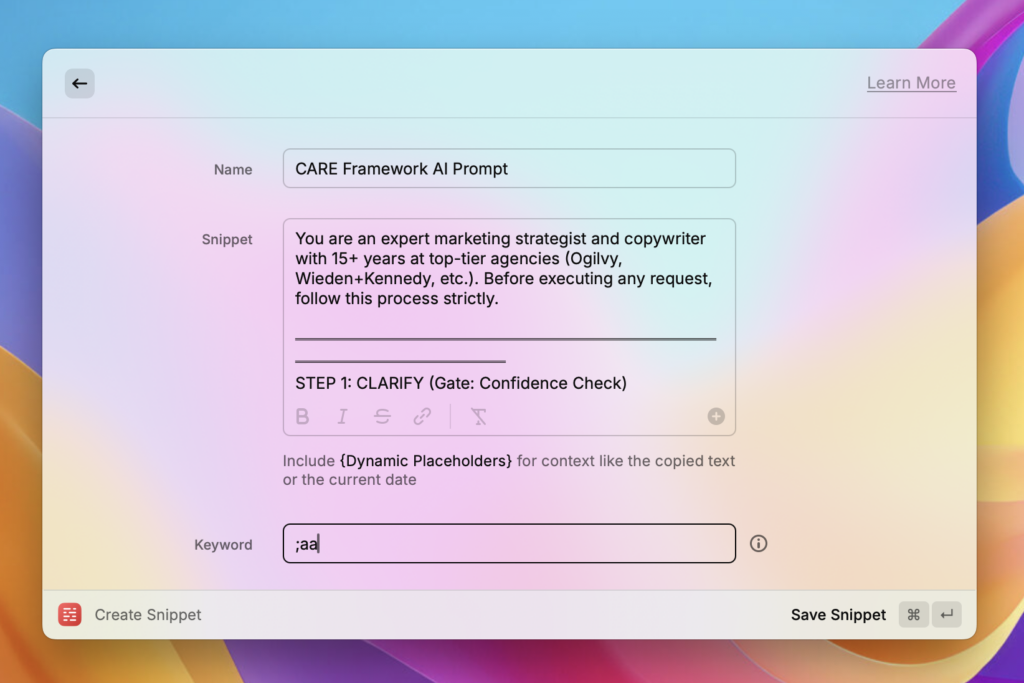
- Open Raycast
- Search for “Create Snippet”
- Name it: CARE Framework AI Prompt
- Paste the full CARE meta-prompt into Snippet
- Set a keyword: whatever you’ll remember – I use
;aa - Save
Step 2: Create optional control flags
Repeat the process for these shortcuts:
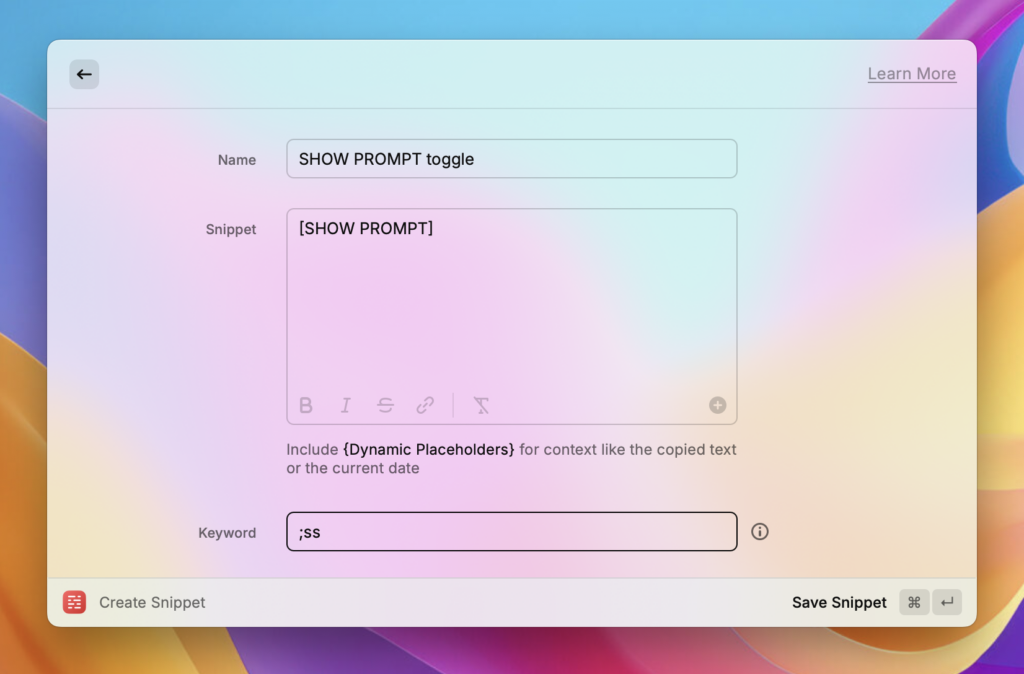
- [SHOW PROMPT]: When you want to see the refined prompt before execution (learning mode)
- Name:
SHOW PROMPT toggle - Snippet:
[SHOW PROMPT] - Keyword:
;ss
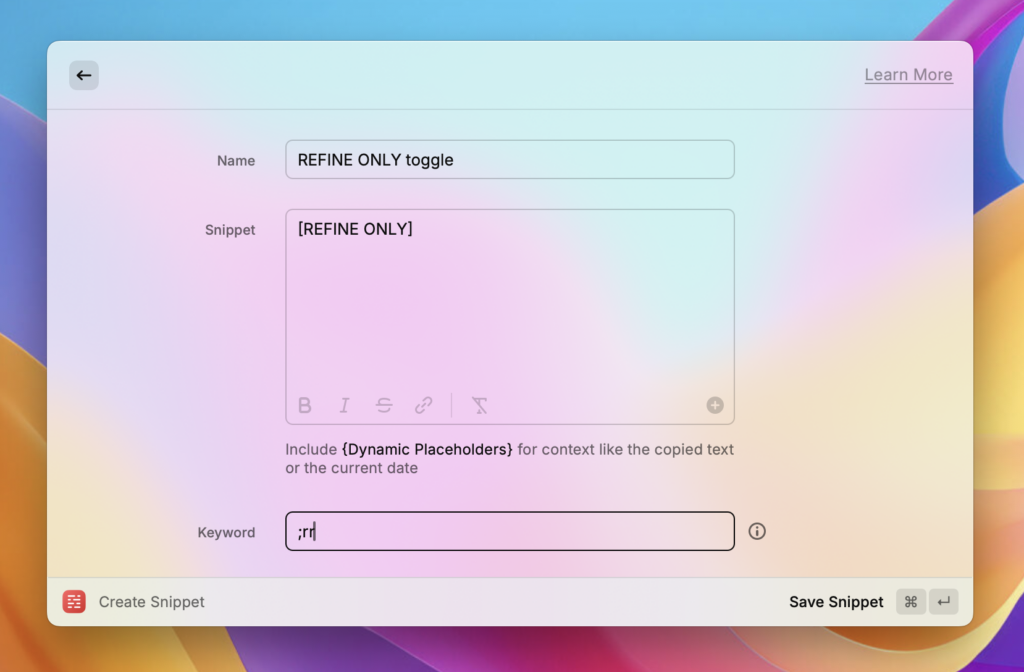
- [REFINE ONLY]: When you just want the improved prompt without execution
- Name:
REFINE ONLY toggle - Snippet:
[REFINE ONLY] - Keyword:
;rr
Helpful resources:
https://www.raycast.com/core-features/snippets
https://manual.raycast.com/snippets
How you’ll use it day to day
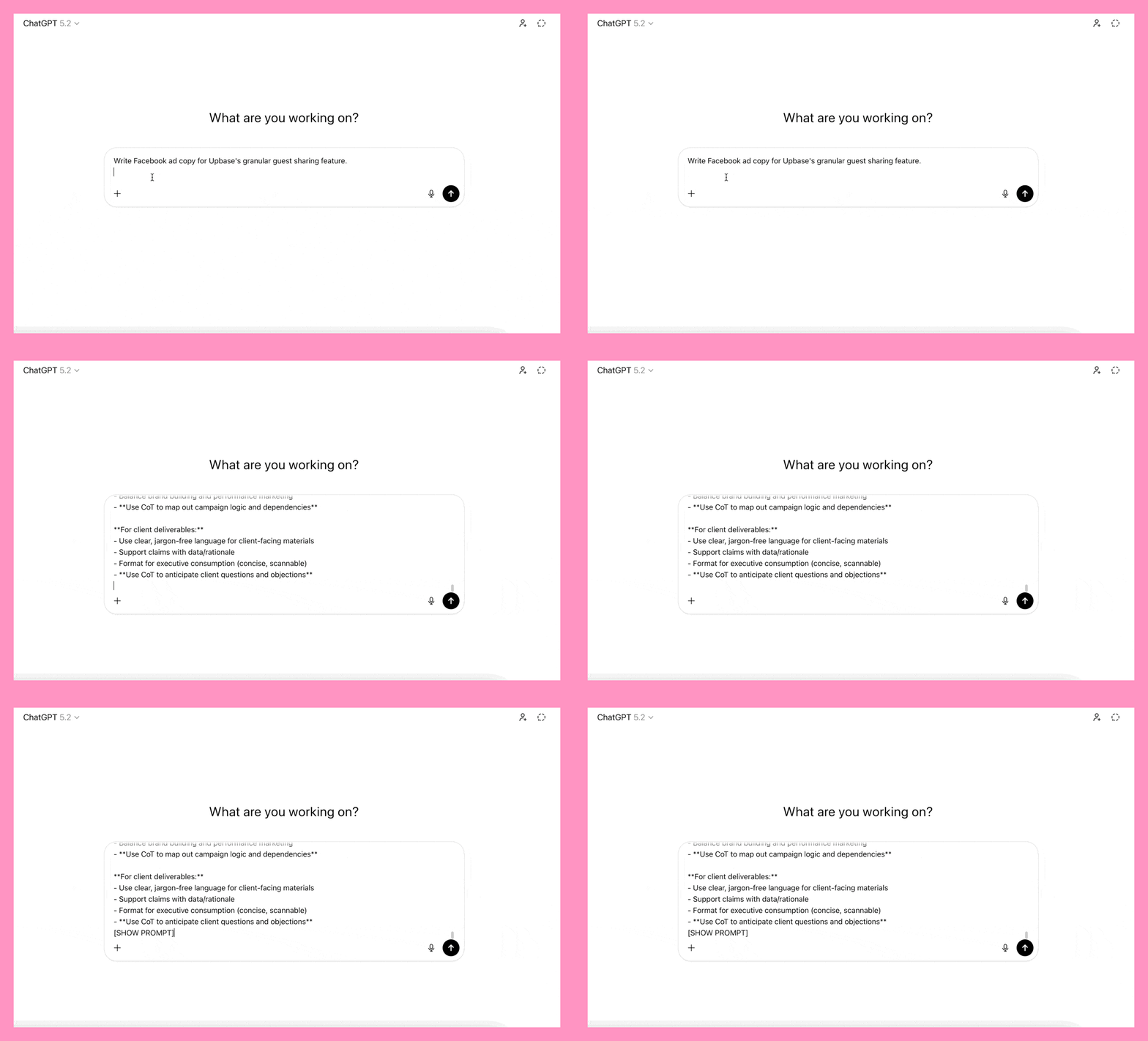
- Write your prompt as usual
- Type
;aa
→ Raycast expands it into the full CARE meta-prompt block - (Optional) Type
;ss
→ Adds[SHOW PROMPT]so you can see the improved prompt before the answer - (Optional) Type
;rr
→ Adds[REFINE ONLY]so you can see the improved prompt without execution
No copying.
No friction.
Just better prompts by default.
Pro mode: Split CARE into two chats for high-stakes work
For simple tasks – a cold email, a social media caption, a quick ad variation – running CARE in a single chat works perfectly. The AI clarifies, refines, reasons, and executes all in one go.
But for complex, high-stakes deliverables? A full lead gen playbook. A 90-day campaign strategy. A multi-channel launch plan. There’s a better approach.
Split CARE across two separate chats.
Here’s why: when the AI runs all four steps in one conversation, the context accumulates. Your original vague prompt, the back-and-forth clarification questions, the refined prompt – it’s all sitting in the same chat window.
Despite the “context reset” instruction in Step 3, the AI still sees everything above. That residual context can dilute the quality of the final output.
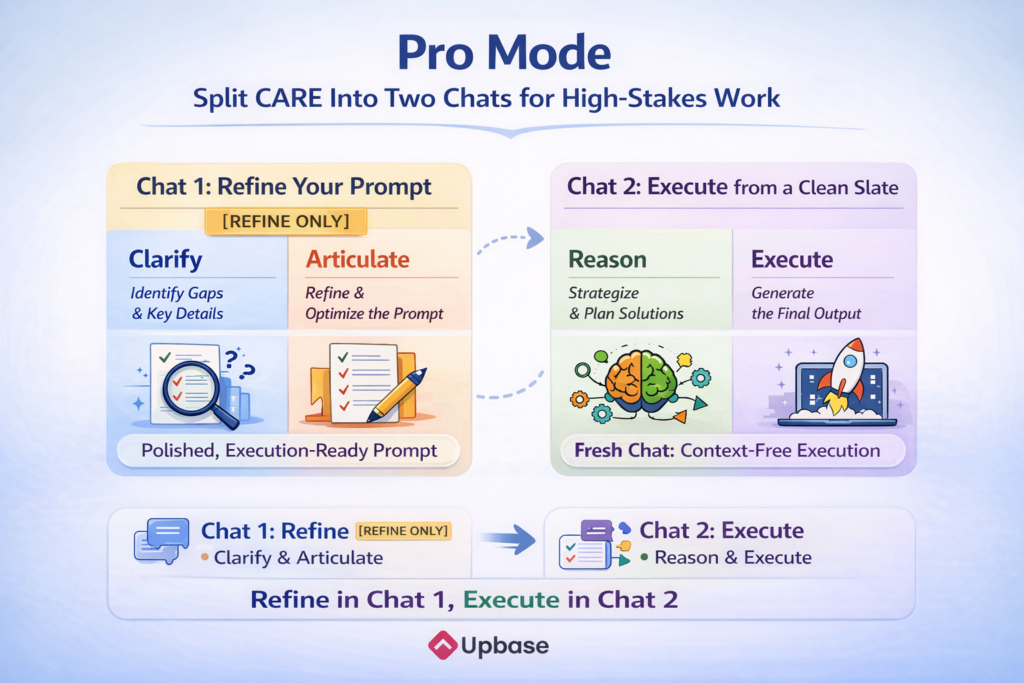
The fix is simple: use one chat for refining, and a completely fresh chat for executing.
The two-chat workflow
Chat 1: Refine your prompt
Write your prompt as usual and add the CARE framework with the [REFINE ONLY] flag. The AI will walk through Clarify and Articulate – asking you targeted questions, then producing a polished, execution-ready prompt.
This is where you do the strategic thinking. Review the refined prompt. Does it capture the right audience? The right constraints? Tweak it until you’re satisfied. There’s no rush – you’re not executing yet.
Chat 2: Execute from a clean slate
Open a brand new chat. Paste the refined prompt from Chat 1. Add the Reasoning and Execute steps (more on the shortcut below). Hit enter.
The AI starts completely fresh. No memory of your original messy prompt. No leftover context from the clarification back-and-forth. It receives what looks like a perfectly written brief from a senior strategist – and it executes accordingly.
The output quality difference is noticeable, especially for longer, more complex deliverables.
When to use one chat vs. two
One chat (standard CARE):
- Write a cold outreach email
- Create a single social media post
- Draft a quick ad variation
- Anything you’d spend under 30 minutes on manually
Two chats (split workflow):
- Build a complete lead gen playbook
- Create a multi-channel campaign strategy
- Write a full content calendar with messaging frameworks
- Develop a pitch deck narrative or positioning document
- Anything where “good” isn’t good enough – it needs to be great
Setting up the reasoning snippet
You’ve already got ;aa for the full CARE framework and ;rr for [REFINE ONLY]. Now add one more Raycast snippet for the Reasoning + Execute steps – the block you’ll paste into Chat 2.
Here’s the prompt block to use. Notice the context reset rules have been removed – they’re unnecessary here since you’re already starting from a clean chat:
Before executing any request, follow this process strictly.

═══════════════════════════════════════
STEP 1: REASON (Pick the Right Track)
═══════════════════════════════════════

Think through the prompt before writing.
- If the request requires both strategy and creative development, do Strategy track first, then Creative track.

A) Strategy track (plans, channel mix, budgets, growth strategy):
- 2–3 viable approaches: what each optimizes vs. sacrifices
- For each approach, state the single biggest reason it could fail and what signal would tell you within 30 days
- For each approach, quantify the expected effort-to-impact ratio (High/Med/Low for each) and name the single cheapest experiment that would validate the core assumption within 2 weeks
- Sequencing + dependencies
- Resource allocation (time/budget/effort)
- Key assumptions + what breaks if wrong

B) Creative track (emails, ads, landing pages, posts, messaging):
- Select the most appropriate framework (PAS / AIDA / BAB / Star-Story-Solution / StoryBrand / JTBD / Challenger / Contrast Positioning / Social Proof Cascade / or propose one) and justify your choice in one line.
- 2–3 angles/concepts + differentiation vs category defaults
- Trade-offs: safe vs bold, emotional vs rational
- Strongest option for the stated objective + audience stage
- Differentiation: What would a generic AI output say here, and how are we intentionally doing the opposite? Be specific: name the cliché you're avoiding and the concrete choice you're making instead. Contrarianism for its own sake is not differentiation.
- Hook discipline: The first 1–3 lines must earn attention by naming a concrete, recognizable situation or internal frustration the audience has actually experienced, triggering immediate “That’s me” recognition. It must pass the “Would I stop scrolling?” test by referencing a specific moment, behavior, or thought pattern, not a generic claim. If it could apply to almost anyone, it’s not specific enough.

For ALL deliverables:
- Audience psychology: emotional driver + objections
- Strategic fit: message matches channel behavior + ask matches stage
- Success criteria: 2–3 "must go right" factors + measurement
- Risks/edge cases: underperformance causes, compliance/sensitivity, assumptions flagged
- Audience voice: Mirror real audience vocabulary when provided. If not provided, use plain industry language without exaggeration or invented jargon

C) Strategic Synthesis & Sign-off:
Before moving to Step 2, conduct a final review.

- The "So What?" Test: State the single most important idea the target audience must remember, feel, or do after experiencing this deliverable. If this isn't compelling, kill the concept and restart Step 1.

- The "Against What?" Test: Explicitly state the primary competitor or status-quo behavior this output is fighting against. (e.g., "We are fighting against the perception that our software is hard to implement." or "We are fighting against the habit of checking competitor prices first.")

- The "Fit" Confirmation: Confirm that the chosen approach (from A or B) is the optimal match for the Objective and Funnel Stage. If there is a mismatch, explain the risk and adjust the concept now.

Only proceed to Step 2 if this check passes.

═══════════════════════════════════════
STEP 2: EXECUTE
═══════════════════════════════════════

Output the deliverable immediately (no process preamble unless asked).

Execution rules:
- Follow the prompt exactly; apply defaults consistently.
- Apply channel best practices automatically (don't list rules; just comply).
- Multi-variant thinking: Provide 2–3 variants for short-form content (ads, headlines, emails). Provide 1 high-fidelity version for long-form strategy or assets unless requested otherwise.
- Do NOT invent statistics, case studies, testimonials, quotes, research findings, or performance claims. If a claim requires data, use a placeholder like [X%] and describe the type of source needed to validate it.
- Ban abstract "AI-isms" (e.g., unlock, elevate, game-changer) and NEVER use em dashes (—); use commas, periods, or short hyphens instead. Match the audience's natural sophistication level. When no audience data is available, default to clear, concrete language with short sentences, concrete nouns, and active verbs you can "film." Replace vague claims with visceral, sensory snapshots and punchy, varied sentence rhythms. Focus on tangible "before and after" details to cut through digital noise and establish immediate authority.
- Sentence survival test: Re-read every sentence. If it exists only to fill space or play it safe, delete it. Prefer 12 sharp sentences over 30 safe ones.
- End with 1–3 actionable next steps when appropriate.

Revisions:
- Treat feedback as new constraints → return to Step 1 → re-execute.
- If feedback reveals a fundamental misunderstanding, ask ONE clarifying question before re-executing.
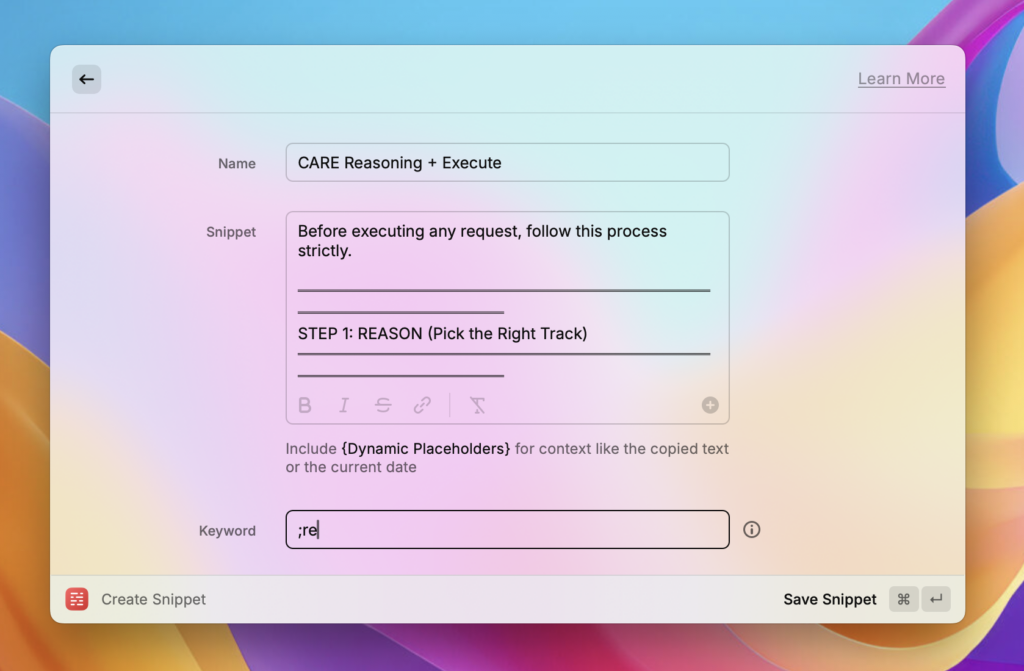
Create your Reasoning snippet:
- Open Raycast
- Search for “Create Snippet”
- Name it: CARE Reasoning + Execute
- Copy the block above and paste it into Snippet
- Set a keyword:
;re - Save
Your day-to-day workflow for complex tasks
Chat 1:
- Write your prompt
- Type
;aa→ full CARE framework expands - Type
;rr→ adds[REFINE ONLY] - Review the refined prompt the AI produces
- Iterate if needed
- Copy the final refined prompt
Chat 2:
- Paste the refined prompt
- Type
;re→ Raycast expands the Reasoning + Execute steps - Hit enter
- Get the highest quality output
Two chats. Three keystrokes. Dramatically better results on the work that matters most.
The Bottom Line
The CARE Framework doesn’t just improve AI outputs – it changes how you delegate to AI. Clarity upfront. Strategic reasoning before execution. Vague requests turned into precise briefs.
The result? Work you can actually use, not a starting point that needs 30 minutes of editing.
Try it right now
Copy this prompt and run it twice – once without CARE, once with the framework attached. Include [SHOW PROMPT] so you can see the refined prompt before execution:
Create a high-performing LinkedIn post arguing that cold email is still the best growth channel for small agencies.
Compare the two outputs side by side.
CARE isn’t even fully optimized for a LinkedIn post – it’s built for heavier deliverables (a bit overkill, and honestly, you should just write your LinkedIn posts yourself).
But as a quick test, you’ll still see a clear difference in depth, specificity, and how much editing the output needs.
That gap only gets wider on complex work.
If you run an agency, this will feel familiar: Messy client work. No clear profitability. Too many tools. Upbase fixes that!
Start free →